
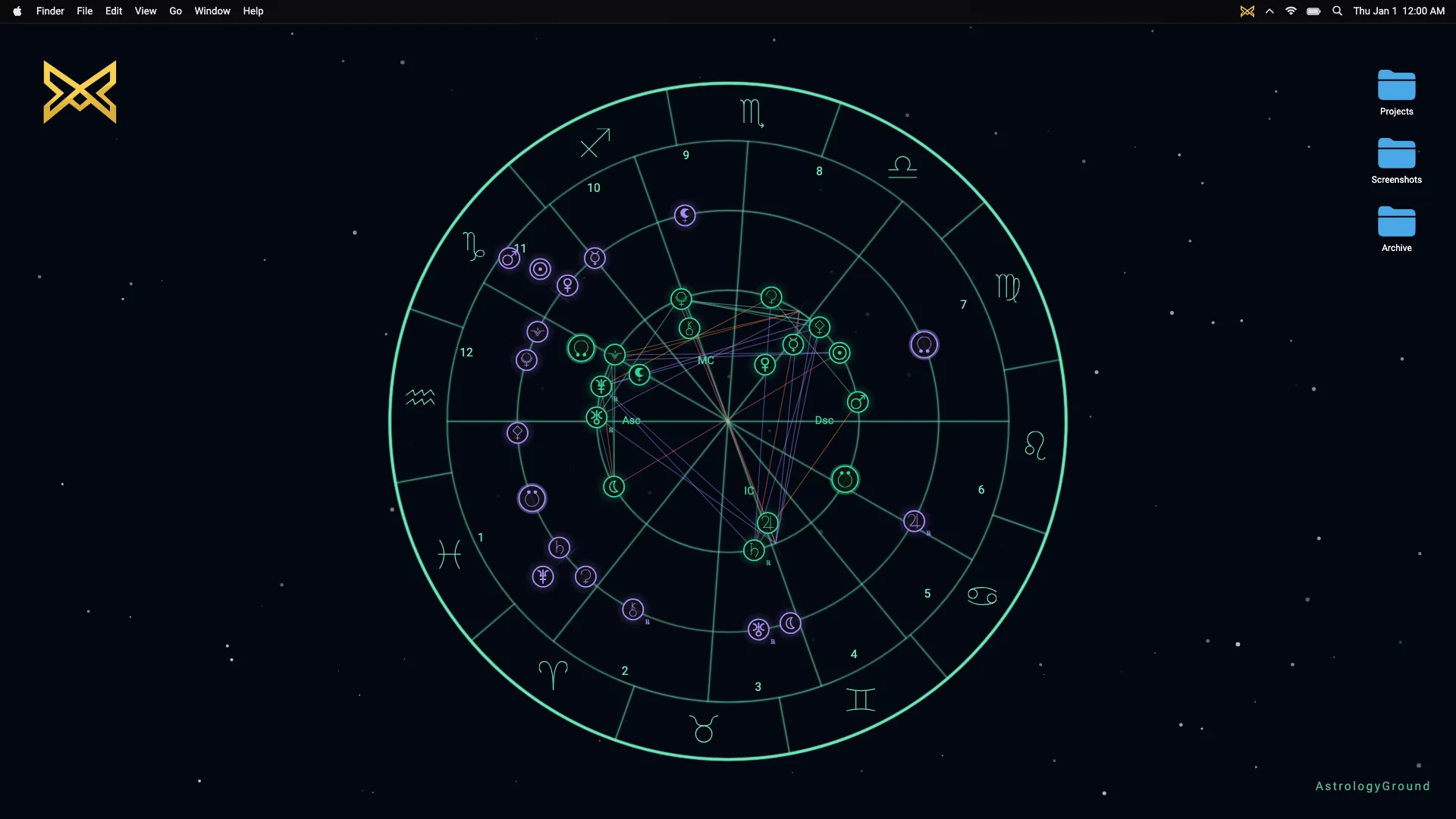
A live transit calculation starts with the current time. An ephemeris gives the positions of the supported bodies for that moment. AstrologyGround places those current positions beside the natal positions calculated for a person’s birth.
The natal chart is the reference. The transit chart is the changing sky. Their relationship is what makes AstrologyGround a live astrology wallpaper, rather than a fixed picture of a chart.
If you are new to the term, start with what live transits are. This article follows the calculation.
Two times, two sets of positions
The natal chart calculation uses a birth instant. Once calculated, its planetary positions stay fixed.
The transit calculation uses the current instant. The engine calculates a second set of planetary positions for that time. In AstrologyGround’s biwheel, the natal chart occupies the inner ring and the current positions occupy the outer ring.
Current transits
Fixed natal chart
These are not two independent pictures placed on top of each other. Their shared angular scale lets the app show where a current body sits in relation to a natal body.
What the ephemeris returns
AstrologyGround’s engine calculates tropical, geocentric positions. In plain language, each supported body’s position is expressed as a degree around the 360-degree zodiac circle from an Earth-centred viewpoint.
A transit position is not an animation coordinate chosen by an artist. It is chart data for a timestamp. As the timestamp changes, the calculated position can change too.
The engine also returns details the chart can use, including the sign, degree within that sign, and whether a body is marked retrograde. Calculation supplies the data; the wallpaper decides how to display it.
How the relationship to the natal chart is measured
Once both sets of positions exist, the app can compare a transit body’s longitude with a natal body’s longitude. The shortest distance around the circle is the basis for an aspect calculation.
That comparison is distinct from calculating either position. First the engine determines where the bodies are. Then the aspect logic asks whether their angular separation is close enough to a recognised angle to display a relationship.
This order matters. An aspect line should follow the computed positions; it should never be drawn merely because it looks good in the composition.
Why the wallpaper checks once a minute
The normal app checks for transit updates on a 60-second timer. It avoids repeating the calculation when it is still within the same minute, and it does not run the transit timer while paused.
This does not mean a planet jumps through the sky once every minute. The underlying positions change continuously. Minute-level checking is a product choice for an ambient desktop surface: keep the displayed chart current without doing unnecessary calculation behind someone’s work.
When an update succeeds, the app replaces the current transit positions while retaining the natal chart. If a calculation fails, it can keep the last calculated state rather than replace the wallpaper with invented positions.
Why a short demo can show faster motion
Real planetary movement is usually too slow to see in a few seconds of ordinary footage. DagazLabs uses a separate marketing capture mode that advances through accelerated ephemeris time while keeping the natal chart fixed.
Each recorded transit state still comes from calculated timestamps. The footage compresses time; it does not invent a decorative path for the planets. That distinction is important when a live wallpaper claims to show the current sky.
What a transit calculation does not tell you
The engine can calculate positions and angular relationships. It does not turn them into a prediction or tell you what decision to make.
AstrologyGround presents the relationship as quiet desktop context. It is not a horoscope feed or an alert service. Birth data stays local on the device for the natal calculation; the Privacy Policy explains the app boundary and the separate optional location lookup.
For the next step in the series, read how astrology aspects are calculated.