
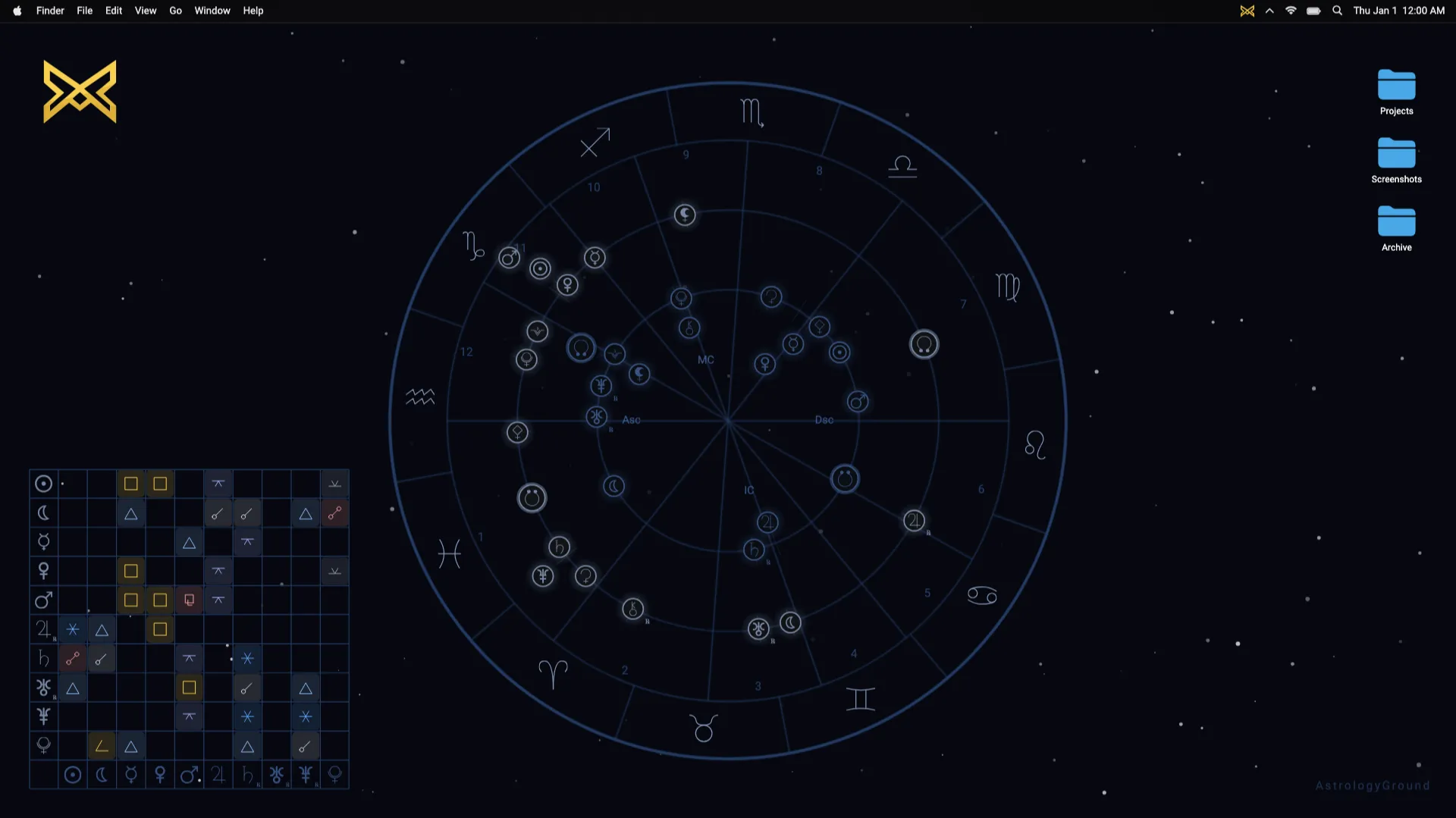
A complete natal chart with angles and houses is calculated by turning a birth date, birth time, and birth location into one moment and one position on Earth.
An ephemeris engine calculates the planetary positions for that moment. The calculation then places those positions on a 360-degree zodiac wheel, constructs the houses, and measures the angular relationships called aspects.
AstrologyGround performs that work locally so the finished natal chart can become the stable centre of a live astrology wallpaper.
A complete chart starts with three inputs
AstrologyGround uses three pieces of Birth Data for a complete time-specific chart:
- the calendar date;
- the local clock time; and
- the birth location.
The date and time alone are not enough. The same clock reading can represent different moments in different time zones. Location is also needed to calculate chart angles and houses.
An approximate time can still place many planets. An accurate time is needed for reliable chart angles and houses. A small change may not move every planet far, but it can move the Ascendant and house cusps enough to change the structure of the chart.
The separate guide to birth time and location explains why both inputs matter.
- 1 · Inputs Birth Data Date, local time, and birthplace
- 2 · Resolve time UTC instant Historical time-zone rules applied
- 3 · Calculate sky Planetary positions Longitudes for the birth instant
- 4 · Build frame Angles and houses Coordinates and house system applied
- 5 · Compare Aspects Angular relationships within their orbs
- 6 · Present Rendered chart Rings, glyphs, lines, and labels
Local birth time becomes a UTC instant
The time written on a birth record is a local wall-clock time. An astrology engine must first determine what that time meant at the birthplace on that date.
AstrologyGround derives the birthplace’s time zone from its latitude and longitude. It then applies the historical rules for that zone, including daylight-saving changes, to convert the entered time into Coordinated Universal Time, or UTC.
Consider a synthetic example: 08:45 in Tokyo on January 1, 2000. The birthplace resolves to the Asia/Tokyo time zone. For that date, the engine converts the entered clock time to 23:45 UTC on December 31, 1999. That UTC instant—not 08:45 in the computer’s current time zone—is what the ephemeris receives.
This distinction matters when someone now lives in a different time zone from the place where they were born. The computer’s current clock setting should not change the chart.
The engine converts the resulting UTC instant into the continuous time value used by its ephemeris calculations.
This was a deliberate correctness boundary for DagazLabs. A natal chart should not change because its owner moved to another country or opened AstrologyGround on a computer with a different time-zone setting.
The ephemeris calculates planetary positions
An ephemeris is a model and dataset used to determine where celestial bodies are at a given time.
AstrologyGround’s engine calculates geocentric positions: positions described from the perspective of Earth. It expresses the relevant longitude of each supported body as a degree around a tropical zodiac wheel.
The result is more precise than a Sun-sign label. Instead of saying only that a body is in a sign, the engine has a position on the full 360-degree circle. That position determines where the body appears in the chart.
This calculation is also why the chart is not interchangeable with decorative zodiac art. The symbols have computed positions rather than placements chosen for visual balance.
Location and house system shape the houses
Planetary positions describe one part of a natal chart. Houses describe another.
To calculate the houses, the engine combines the birth instant with the birthplace’s latitude and longitude. It also needs a house system because different systems divide the chart in different ways.
AstrologyGround supports Placidus, Whole Sign, Koch, and Equal houses. Changing the house system does not recalculate the sky into different planetary positions. It changes how the houses are constructed and where their cusps appear.
This is one reason two charts made from the same Birth Data can look different. The difference may come from a setting rather than an error in the planetary calculation.
Aspects are measured after positions are known
Once the bodies have positions, the engine can measure the shortest angular distance between them.
An aspect is a named angular relationship. A conjunction is centred on 0 degrees, a square on 90 degrees, a trine on 120 degrees, and an opposition on 180 degrees. Other aspect types use other target angles.
The distance does not need to equal the target angle perfectly. Each aspect has an allowed tolerance called an orb. The engine compares the measured separation with the target angle and records an aspect when the difference falls within that orb.
AstrologyGround can use these calculated relationships in its aspect lines and aspect grid. They are derived from the chart positions rather than added as decoration.
See how astrology aspects are calculated for the angle and orb rules behind the display.
A real engine check
DagazLabs keeps representative charts in the engine’s regression tests. These cases make calculation changes visible instead of relying on whether a chart merely looks plausible.
One synthetic case uses July 30, 2026 at 14:30 UTC, coordinates 44.8125° north and 20.4612° east, and Koch houses. Rounded to three decimal places, AstrologyGround calculates:
- the Sun at 127.454°, or 7.454° Leo;
- the Moon at 318.735°, or 18.735° Aquarius;
- the Ascendant at 253.420°, or 13.420° Sagittarius; and
- the Midheaven at 186.759°, or 6.759° Libra.
For the same chart, the strongest aspect in the calculated set is a Neptune-Pluto sextile with an orb of about 0.068°. The regression test also checks the selected house system, Moon house, aspect count, and other supported points.
This is the level at which the engine works. The chart is not assembled from sign labels. It is produced from positions and angular relationships that can be recorded, compared, and tested again after the calculation code changes.
Calculation becomes a chart only when it is rendered
The calculation result is structured data: planetary longitudes, chart angles, house cusps, retrograde states, and aspects.
The chart renderer turns that data into rings, glyphs, lines, and labels. AstrologyGround uses a biwheel layout. The natal chart stays fixed as the personal reference, while live transits show the current sky around it. The next guide explains how those live transits are calculated.
Separating calculation from presentation is important. A theme can change colours or visibility without changing the underlying natal positions. The wallpaper can stay calm and visually restrained while the chart beneath it remains technically specific.
What the calculation does not do
A natal chart calculation produces geometry. It does not, by itself, produce advice, a forecast, or a claim about what someone should do.
Interpretation is a separate layer. AstrologyGround is designed to keep the calculated chart and live transits present on the desktop without turning every change into an alert or horoscope feed.
That boundary is part of the product: show the chart accurately, let it change truthfully, and avoid manufacturing urgency around it.
Why AstrologyGround calculates locally
Birth Data is needed to create the natal chart, but it does not need to become a web account dependency.
AstrologyGround performs its core chart calculation on the device. The birth date, time, confirmed location, and chart settings are stored and processed locally. An optional place-name lookup is separate from the chart calculation and does not send the birth date or birth time with the location query.
You can read the complete boundary in why birth data stays local and the formal Privacy Policy.
Where the custom engine fits
The engine connects all of these steps: resolving the birth instant, calculating the sky, constructing houses, detecting aspects, and preparing the chart data that the wallpaper renders.
That is why DagazLabs built a custom astrology engine for AstrologyGround. The technical work exists to support a simple product promise: a natal chart and the current sky, alive on the desktop without becoming a feed.
Continue with what live transits are to see how the current sky relates to this fixed chart.