
Static zodiac art, animated zodiac wallpaper, and a live natal chart wallpaper can look related on a screen. They do different jobs.
The useful distinction is not whether something moves. It is whether the state is calculated for you and for the current time.
AstrologyGround is a live astrology wallpaper. It combines a fixed natal chart with changing transit positions on a Windows or macOS desktop.
The short answer
Choose static zodiac art when you want a finished image.
Choose animated zodiac wallpaper when you want visual motion, but do not need the image to represent a current chart state.
Choose a live natal chart wallpaper when you want a personal chart to remain fixed while the calculated current sky changes around it.
- Birth Data
- Not needed
- Change
- None
- Best for
- Simple decoration
- Birth Data
- Usually not needed
- Change
- Looped motion
- Best for
- Atmosphere
- Birth Data
- Needed
- Change
- Current transits
- Best for
- Personal context
Static zodiac art is a finished file
A static wallpaper can be beautiful, lightweight, and easy to use. It might show a zodiac sign, constellation, planet, or decorative chart wheel.
Nothing about that simplicity is a weakness. If the goal is a consistent visual mood, a still image may be the right answer.
It does not need your Birth Data. It also does not claim to show your natal chart or the current sky.
Animated zodiac wallpaper adds motion
An animated wallpaper can add drifting stars, rotating symbols, particles, or a looping chart animation.
That motion may be entirely visual. When the loop restarts, it shows the same prepared sequence again. The planets do not need to match the current timestamp.
This format suits someone who wants movement more than calculation.
A live natal chart wallpaper recalculates state
AstrologyGround starts with a natal chart based on birth date, time, and location. That chart is the fixed reference.
It then calculates live transits for the current time. The transit positions and their relationships to the natal chart can change while the birth chart remains the same.
In the example below, gold marks the natal layer. Blue marks the transit layer for January 1, 2026.
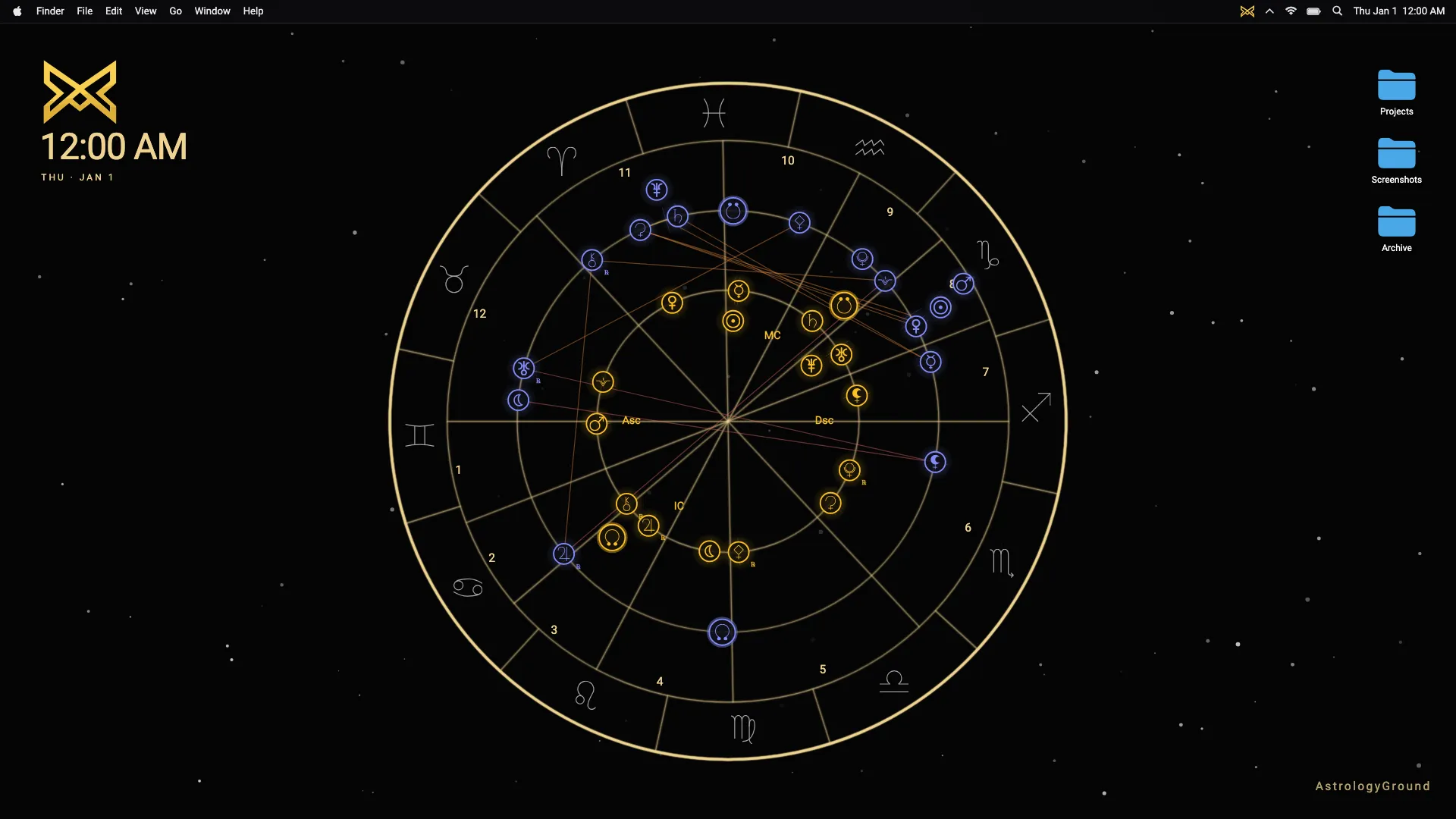
This is not a prerendered zodiac loop. Read what changes in a live astrology wallpaper to compare three calculated dates from the same sample chart.
The tradeoffs are real
Static art is the simplest format to save, share, and understand. It uses no birth details and does not depend on a running desktop app.
Animated wallpaper creates atmosphere, but motion can become distracting. It may also use more system resources than a still image.
A live natal chart wallpaper needs accurate Birth Data and a calculation engine. It asks more of the product, but it can show personal and current context that a fixed file cannot.
AstrologyGround keeps Birth Data local on the device. It is designed as calm desktop context, not a horoscope feed or alert system.
Which format fits you?
Pick static zodiac art if you want decoration that stays exactly as chosen.
Pick animated zodiac wallpaper if the visual movement is the main appeal.
Pick a live natal chart wallpaper if you care about the difference between your birth chart and the current calculated sky.
The live astrology wallpaper guide explains the category in more detail. The Download page has the current Windows and macOS availability.